Mountain Lion Installation Issues for Developers
After upgrading to OS X Mountain Lion, gcc, make and svn stopped working. Installing Xcode's command line tools fixed it.

I’ve installed Mac OS X Mountain Lion on my laptop. The early reviews were really good, so I didn’t wait long to install it. It seems to be working well, although we’re still waiting for the Facebook sharing feature. The Twitter integration works well for me, and it’s amazing. I’ll probably start using Safari now that I’ve installed Mountain Lion.
This morning, I realised that some tools, such as gcc and make, weren’t available, and some command-line tools weren’t working: the svn and make commands both failed. I later found out that I needed to upgrade Xcode to version 4.4 to make everything work properly, so I installed the new version of Xcode. But the command-line tools still didn’t work.
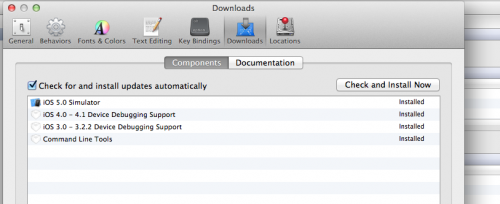
Then I checked the command line tools in Xcode. Open the latest version of Xcode and go to Preferences → Downloads. The command line tools weren’t installed; you have to install them manually from there. That fixed all the issues, and Mountain Lion now works well for me :)
Tip: on newer versions of macOS, you can install the command line tools by running xcode-select --install in Terminal.