Get Contacts with Images from an Android Phone and Sort Them by Name — Android PhoneGap App
Fetch contacts with their photos in an Android PhoneGap app, group them by first letter and sort them by name.
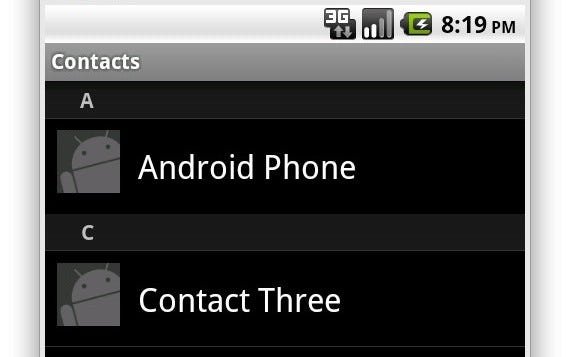
I needed to fetch contact details from the phone in an Android PhoneGap application. Be aware that this method is slow and doesn’t work well with more than about 200 contacts, but it’s useful when you don’t need anything more complex. The sorting is also fairly basic, so please let me know if you have a better solution.
The contacts are displayed in an element with the ID contacts.
Step 1: Use the JavaScript code below to fetch the contacts from the phone.
var options = new ContactFindOptions();
        options.filter="";
        options.multiple=true;
        var filter = [ "displayName", "phoneNumbers", "photos" ];
        navigator.contacts.find(filter, displayContact, onContactError, options);
Step 2: The displayContact function groups the contacts by the first letter of their name, sorts them, and displays them.
function displayContact(contacts)
{
    $("#contacts").html("");
    var myContacts = new Object();

    // Default image path for the profile image
    var defaultImagePath = $("#defaultImagePath").attr('src');

    for (var i = 0; i < contacts.length; i++)
    {
        if (contacts[i].phoneNumbers == null)
            continue;

        // Use the contact's photo if there is one
        var img = contacts[i].photos != null ? contacts[i].photos[0].value : defaultImagePath;

        for (var j = 0; j < contacts[i].phoneNumbers.length; j++)
        {
            var pNumber = contacts[i].phoneNumbers[j].value;
            var name = contacts[i].displayName != null ? contacts[i].displayName : "No name";

            // Group the names by their first letter
            var index = name.substring(0, 1).toUpperCase();
            if (typeof myContacts[index] == 'undefined')
            {
                myContacts[index] = new Array();
            }

            // Shorten long names
            if (name.length > 35)
            {
                name = name.substr(0, 35) + "...";
            }

            // Store the details for this number
            myContacts[index].push({"name": name, "pNumber": pNumber, "img": img});
        }
    }

    var arrayKeys = new Array();
    for (var key in myContacts)
    {
        arrayKeys.push(key);
    }

    // Sort the groups by letter: A, B, C and so on
    arrayKeys = arrayKeys.sort();

    for (i = 0; i < arrayKeys.length; i++)
    {
        var records = myContacts[arrayKeys[i]];
        $("#contacts").append("<li class='letter'>" + arrayKeys[i] + "</li>");

        // Sort the names within each group
        records = records.sort(sortNames);

        for (var r_key in records)
        {
            $("#contacts").append("<li><img src='" + records[r_key].img + "' /> " +
                records[r_key].name + " " + records[r_key].pNumber + "</li>");
        }
    }

    hide_loader();
    $('.addressBook').effect("slide", {direction: "right"}, 500);
}

function sortNames(a, b)
{
    return a.name.toLowerCase() > b.name.toLowerCase() ? 1 : -1;
}
There’s an easier way to fetch contact details, which I’ll explain in my next post.
Note: the HTML in this code was stripped out when the post was imported, so the list markup and loop conditions above have been restored.